
Visual AI Collaboration Canvas: Transform Team AI Projects
How Spatial Workspaces Solve Context Loss, Model Fragmentation, and Workflow Chaos
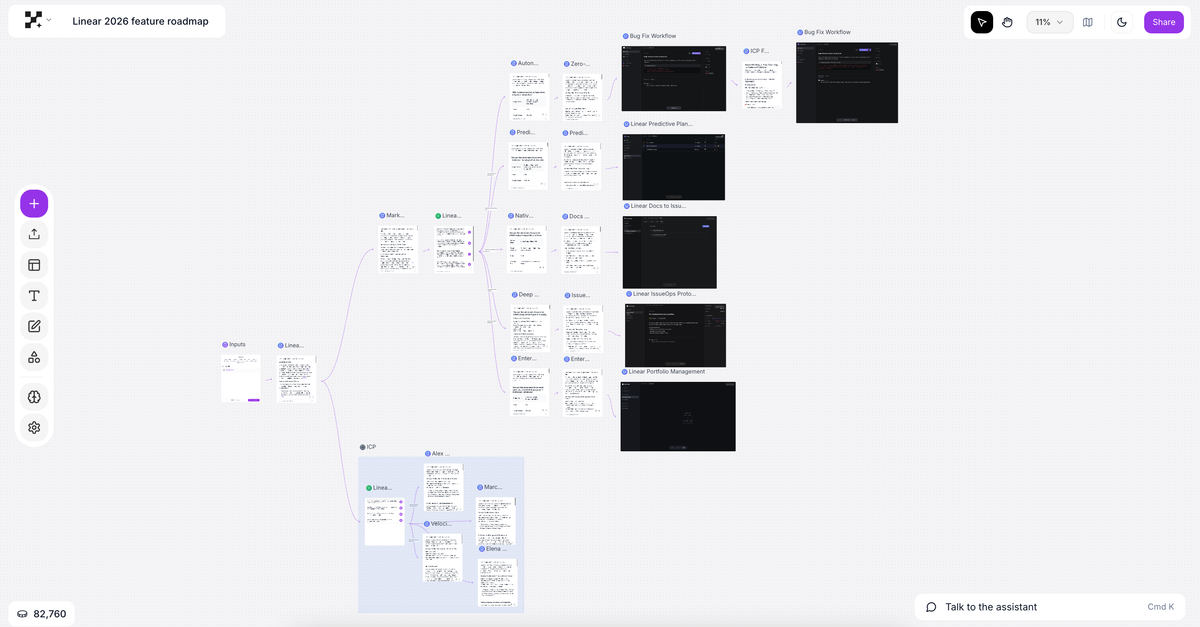
Your AI project is drowning in chat threads. You've got critical context scattered across 47 different conversations, three team members working with different AI models giving contradictory outputs, and nobody can see the reasoning chain that led to your current approach. When someone asks "why did we choose this direction?" you're faced with endless scrolling through linear chat history.
This isn't a people problem—it's a workspace problem. Traditional AI collaboration tools force spatial thinking into linear formats, creating what researchers call "context collapse." Teams waste up to 30 hours weekly due to collaboration breakdowns, and with AI becoming a core coworker (76% of executives now view AI this way), we need workspaces designed for how humans and AI actually work together.
Enter the visual AI collaboration canvas: a spatial approach that transforms how teams ideate, experiment, and deliver AI-powered work. Instead of fighting linear chat limitations, visual canvases let you map connections, preserve context, and see the full picture of your AI collaboration in one place.
The Hidden Cost of Linear AI Collaboration
When Context Gets Lost in the Scroll
Picture this: Your marketing team spent two weeks with ChatGPT developing a content strategy. The breakthrough came in message #143, building on insights from messages #67 and #89. Now, your designer joins the project and asks, "What's our positioning again?" Someone has to reconstruct the entire conversation thread, hoping they remember which insights were validated and which were discarded.
This is context collapse in action. A recent longitudinal study tracking software teams from 2023–2025 found that while teams initially hoped AI would enhance coordination, it primarily accelerated individual tasks while fragmenting collaborative workflows. The problem? Linear chat interfaces treat each conversation as independent, making it nearly impossible to maintain spatial relationships between ideas.
The Multi-Model Chaos
Here's another scenario playing out in organizations daily: Your data scientist uses Claude for code generation, your copywriter uses ChatGPT for content, and your analyst uses Gemini for research. Each model has different strengths, but the outputs live in completely separate tools. Nobody can see how the pieces fit together until someone manually creates a Frankenstein document stitching everything together.
This model fragmentation creates what Accenture calls "co-learning gaps"—only 11% of organizations are equipped for effective human-AI co-learning because their tools don't support it. Teams need access to multiple AI models, but they also need a unified workspace where those models can interact with shared context.
The Trust and Transparency Problem
When AI makes a recommendation in a chat interface, can you see its reasoning? Can you trace back through the assumptions and context that shaped its output? Can you identify where it might be hallucinating?
Research on human-AI teams shows that trust diminishes over time when AI systems lack transparency. Initial overestimation of AI capabilities gives way to skepticism when teams can't verify the reasoning chain. Without visibility into how AI reaches conclusions, teams either over-rely on unvetted outputs or waste time manually fact-checking everything.
The Linear vs. Visual AI Collaboration Gap
Challenge | Linear Chat Tools | Visual AI Canvas |
Context Preservation | Lost in scroll; message #143 problem | Spatially mapped; always visible |
Multi-Model Workflows | Separate tools, manual stitching | 300+ models, unified context |
Team Onboarding | Reconstruct entire history | See full canvas at a glance |
AI Transparency | Black-box outputs | Full reasoning chain visible |
Async Collaboration | Fragmented threads | Branching, version-controlled |
Trust Over Time | Erodes without visibility | Builds through transparency |
What Makes Visual AI Collaboration Different?
Spatial Context Preserves Meaning
Our brains are spatial. We remember "that idea in the upper right" better than "message #143." Visual AI collaboration canvases work with human cognition instead of against it.
On a visual canvas, your AI conversations become nodes in a network. That initial research prompt connects to three analysis branches. Those analyses feed into a synthesis. The synthesis informs your strategy. At any point, anyone can see the entire reasoning chain without scrolling, searching, or asking "wait, why did we decide that?"
Observable, a data analysis platform, recently introduced spatial canvases specifically because "two-dimensional organization makes it easier to track progress and show your work." The same principle applies to AI collaboration—spatial arrangement creates meaning that linear formats can't capture.
Multi-Model Orchestration in One Workspace
Visual AI collaboration platforms give you access to 300+ models—not as separate tools, but as different brushes on the same canvas. Need Claude's coding capabilities? Add it to your canvas. Want GPT-4's creative writing? Connect it to Claude's output. Require Gemini's multimodal analysis? Feed it the results from both.
This isn't just convenience—it's a fundamentally different workflow. Instead of tool-switching chaos, you're orchestrating models based on their strengths within a unified context. Your web designer can see how the data analyst's Gemini research informed the copywriter's ChatGPT content, all in one visual workspace.
Transparency Through Visualization
When AI reasoning becomes visual, trust becomes manageable. On a visual canvas, you can see at a glance:
- The exact prompt that generated each output
- Which context fed into each AI response
- How different models approached the same problem
- Where outputs diverged or contradicted each other
- The full chain from initial question to final recommendation
This transparency isn't about distrusting AI—it's about working with it intelligently. A study on generative AI and collaboration found that teams perform best when they can "review and filter AI-generated content before sharing it." Visual canvases make this review process natural and efficient.
Version Control for AI Work
Remember when Google Docs revolutionized collaboration with version history and simultaneous editing? Visual AI canvases bring that same revolution to AI work. Your team can:
- Branch explorations without losing the main thread
- Roll back to earlier approaches if needed
- See who contributed what, when
- Work asynchronously without stepping on each other's toes
This is particularly critical as AI becomes a "coworker" rather than just a tool. You need the same collaboration infrastructure for human-AI work that you have for human-human work.
Real-World Applications — From Chaos to Clarity
Product Development Teams
A product team uses a visual AI canvas to map their entire discovery process. User research insights (analyzed by Claude) connect to competitive analysis (researched by Perplexity) which informs feature ideation (brainstormed with GPT-5.2). Design mockups (generated by Nano Banana 2) link to technical feasibility assessments (evaluated by Claude). The entire product strategy exists in one visual space where any stakeholder can trace how user needs led to specific features.
Content Marketing Operations
A content team orchestrates their entire workflow visually. SEO research branches into multiple content angles. Each angle gets explored by different AI models. The best outputs feed into a master content calendar. Writers can see the research foundation for their assignments. Editors can check if content aligns with original strategy. All without jumping between six different tools.
Data Science Projects
A data science team maps their model development process. Data cleaning scripts (written with Claude) connect to exploratory analysis (using Python with GPT assistance) which informs feature engineering approaches (validated against industry papers pulled by Perplexity). Each experiment branches from the main workflow, preserving context about what worked and what didn't. New team members can see the entire experimental history at a glance.
Strategic Planning
An executive team uses a visual AI canvas for strategic planning. Market research, competitive intelligence, financial projections, and scenario planning all exist in one spatial workspace. Different executives can explore different branches with AI assistance while maintaining shared context. When it's time to decide, everyone can see the full landscape of analysis that informed the options.
Visual AI Canvas Use Cases by Team Type
Team Type | Primary Use Case | Key AI Models Used | Core Benefit |
Product Development | Discovery & feature mapping | Claude, GPT-4, Midjourney, Perplexity | Full traceability from user need to feature |
Content Marketing | Multi-step content workflows | GPT-4, Claude, Perplexity | No tool-switching; unified strategy view |
Data Science | Experiment tracking & methodology | Claude, GPT-4, Perplexity | Full experimental history for new members |
Strategic Planning | Scenario analysis & synthesis | Claude, Gemini, GPT-4 | Shared context across executive team |
Cross-Functional | Shared AI context across disciplines | 300+ models as needed | Eliminates siloed AI outputs |
The Difference — Visual AI Collaboration Done Right
While tools like Miro and Mural offer visual collaboration, their AI capabilities are add-on features, not the core experience. Platforms like ChatGPT Teams provide AI power but trap it in linear chat. Getspine.ai was built from the ground up around a simple insight: AI collaboration should be spatial, transparent, and multi-model from day one.
Infinite Canvas, Infinite Possibilities
Getspine.ai's visual canvas isn't a constrained workspace—it's an infinite space for your team's AI collaboration to grow organically. Start with a central question. Branch into explorations. Converge on insights. Loop back to iterate. Your canvas becomes a living map of your team's collective intelligence, human and artificial.
300+ AI Models, One Unified Context
Why limit yourself to one model's perspective? Getspine.ai gives you access to 300+ AI models—GPT, Claude, Gemini, Mistral, Llama, specialized models for code, research, image generation, and more. The difference? They all work within the same visual context. Information flows between models seamlessly. No more copy-pasting between tools or losing context in tool switches.
Transparency That Builds Trust
Every AI output on Getspine.ai shows its reasoning. You can trace the full chain from input to output. You can see where models agree and disagree. You can identify potential hallucinations. This isn't about making AI mysterious—it's about making AI collaboration intelligent and trustworthy.
Built for Team Workflows
Getspine.ai treats async collaboration as a first-class feature. Your team can work across time zones without losing context. Version control ensures you can explore without fear. Branch explorations let multiple approaches coexist. When it's time to converge, everyone has the full picture.
From Exploration to Execution
Visual AI collaboration isn't just about thinking—it's about doing. Getspine.ai canvases can feed into execution workflows. That research canvas informs content production. That strategy canvas drives project management. That data analysis canvas generates reports. The same visual workspace takes you from question to deliverable.
FAQ: Visual AI Collaboration Canvas
What is a visual AI collaboration canvas?
A visual AI collaboration canvas is a spatial workspace where teams collaborate with AI tools using a two-dimensional interface instead of linear chat. It allows you to organize AI conversations, outputs, and workflows spatially—mapping connections between ideas, preserving context visually, and enabling multiple team members to work with multiple AI models in a unified environment.
How is a visual AI canvas different from regular chat-based AI tools?
Chat-based AI tools (like ChatGPT or Claude) present conversations linearly, making it difficult to maintain context across multiple threads or team members. Visual AI canvases represent conversations and outputs as connected nodes in a spatial layout. This prevents context collapse, makes relationships between ideas visible, enables better collaboration across team members, and allows easy integration of outputs from multiple AI models.
Can multiple team members collaborate on the same AI canvas?
Yes, visual AI collaboration canvases are designed for team collaboration. Multiple team members can work on the same canvas simultaneously or asynchronously. Each person can contribute their own AI-assisted explorations while maintaining shared context. Version control and branching features allow parallel explorations without conflicts, similar to how developers collaborate on code using Git.
What types of teams benefit most from visual AI collaboration?
Teams that benefit most include:
- Product development teams coordinating research, ideation, and design
- Content and marketing teams orchestrating multi-step workflows
- Data science teams tracking experiments and methodologies
- Strategic planning teams synthesizing complex information
- Cross-functional teams needing shared context across disciplines
Essentially, any team where AI work involves multiple steps, multiple perspectives, or multiple stakeholders.
How do visual AI canvases handle multiple AI models?
Advanced visual AI collaboration platforms allow you to use different AI models (GPT, Claude, Gemini, etc.) within the same canvas, each represented as different nodes. Outputs from one model can feed into prompts for another model, enabling multi-model workflows. This orchestration happens within unified context, so information flows seamlessly between models without manual copy-pasting.
Do I need technical skills to use a visual AI collaboration canvas?
No. Visual AI canvases are designed for knowledge workers, not developers. The interface is visual and intuitive—you arrange elements spatially, connect them with arrows or relationships, and interact with AI through natural language. The visual nature often makes complex AI workflows more accessible than command-line tools or complex prompting syntax.
Conclusion: Transform Your Team's AI Collaboration Today
The future of AI collaboration isn't about better chat interfaces—it's about workspaces designed for how teams actually think, explore, and create together. Linear tools create linear limitations. Spatial workspaces unlock spatial possibilities.
If your team is struggling with any of the following, it's time to experience visual AI collaboration designed for these exact challenges:
- Lost context in endless chat scrolls
- Fragmented workflows across multiple AI tools
- Difficulty maintaining shared understanding
- Inability to see AI reasoning and catch hallucinations
- Challenges collaborating asynchronously on AI projects
Ready to see the difference? Explore how Getspine.ai's visual AI collaboration canvas transforms team-based AI work. Access 300+ AI models, preserve context spatially, maintain transparency throughout your workflows, and collaborate seamlessly across your team—all on one infinite canvas. Visit getspine.ai to start your visual AI collaboration journey.
© Getspine.ai — All rights reserved.